
Order questions, answered automatically
SupportKontor answers the questions your customers keep asking: where's my parcel, cancellation, address change, return, plus anything your own pages already answer. Once you approve, the assistant runs the matching action right in Shopware. Less work on support mail, no extra system to run.
- Replies in your name
- Stored in the EU
- No AI training
- Set it up yourself
Where's my order #10482? Ordered on Monday.
Hi, order #10482 went out today and arrives tomorrow. The tracking link is attached.
Built for German customer service
- Shopware
- GDPR-compliant
- Data stored in the EU
- No AI training
- Audit log
- Deleted after 90 days
What SupportKontor handles
Most support mail is the same few questions: about an order, or about what your own pages already say. Those are the ones SupportKontor takes over, with a log for every reply.
Shipping status
Pulls the real status from your shop and answers “Where's my order?”.
Cancellation
Checks whether an order can still be cancelled, then cancels once you approve.
Address change
Takes the new address and updates the order while shipping still allows it.
Returns
Explains the returns route and starts the return by your rules.
Questions about your pages
Shipping costs, countries you ship to, payment methods: answered from your own pages.
Payment status
“I transferred it, has it arrived?” Answered from what your shop has recorded.
Up and running in three steps
No system change, no new mailbox for your customers. You forward your support mail, SupportKontor does the rest.
Where's my order #10482? Ordered on Monday.
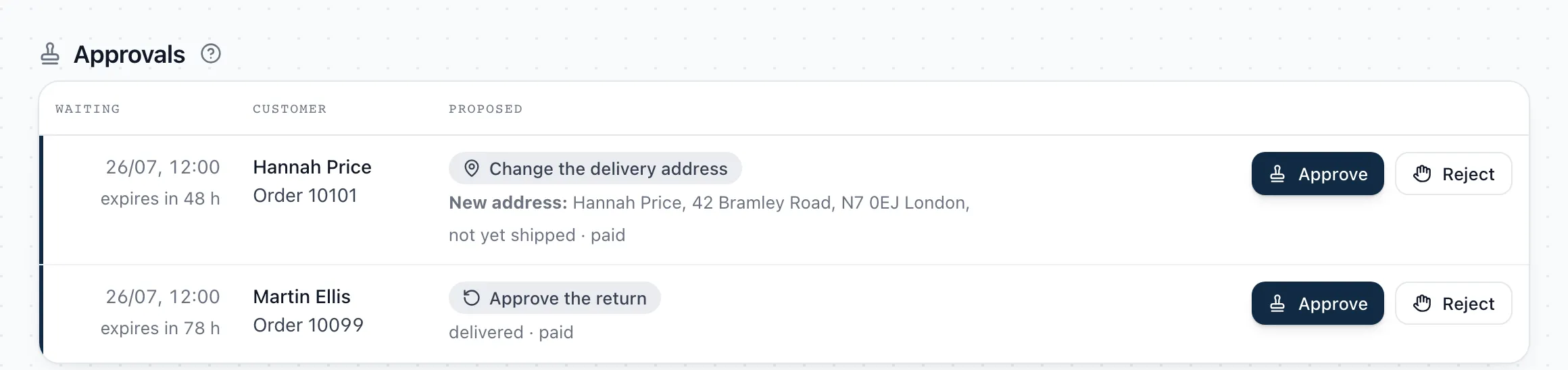
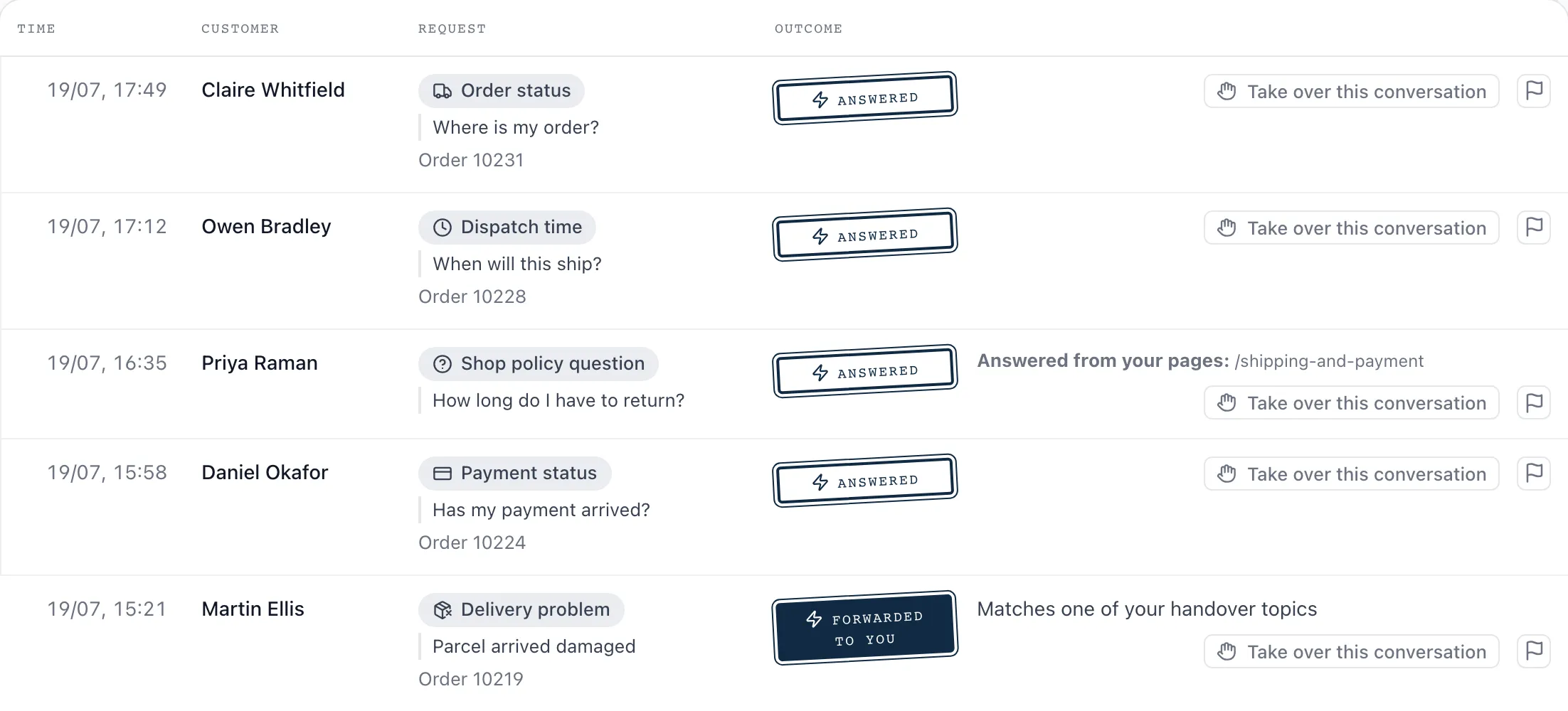
The panel where you approve
SupportKontor runs inside your Shopware administration, with no second inbox and no extra login. Two views: what is waiting on you, and what has already been decided.
You decide how far the assistant goes
You set this per request type. Order status can answer on its own while cancellations still wait for your approval.
“The product asks permission until you tell it to stop asking.”
- Level 0
Draft only
The assistant decides and drafts, but nothing is sent and nothing changes in your shop. You see in the log what it would have written, and answer the mail yourself as before.
- Level 1
On approval
The assistant prepares the reply and the action and puts them in front of you. Only your click releases either. Undecided proposals expire after 48 hours and land in your inbox, so nobody waits indefinitely.
- Level 2
Automatic
The assistant replies and acts on its own. Every action is still in the log, together with the level it ran at.
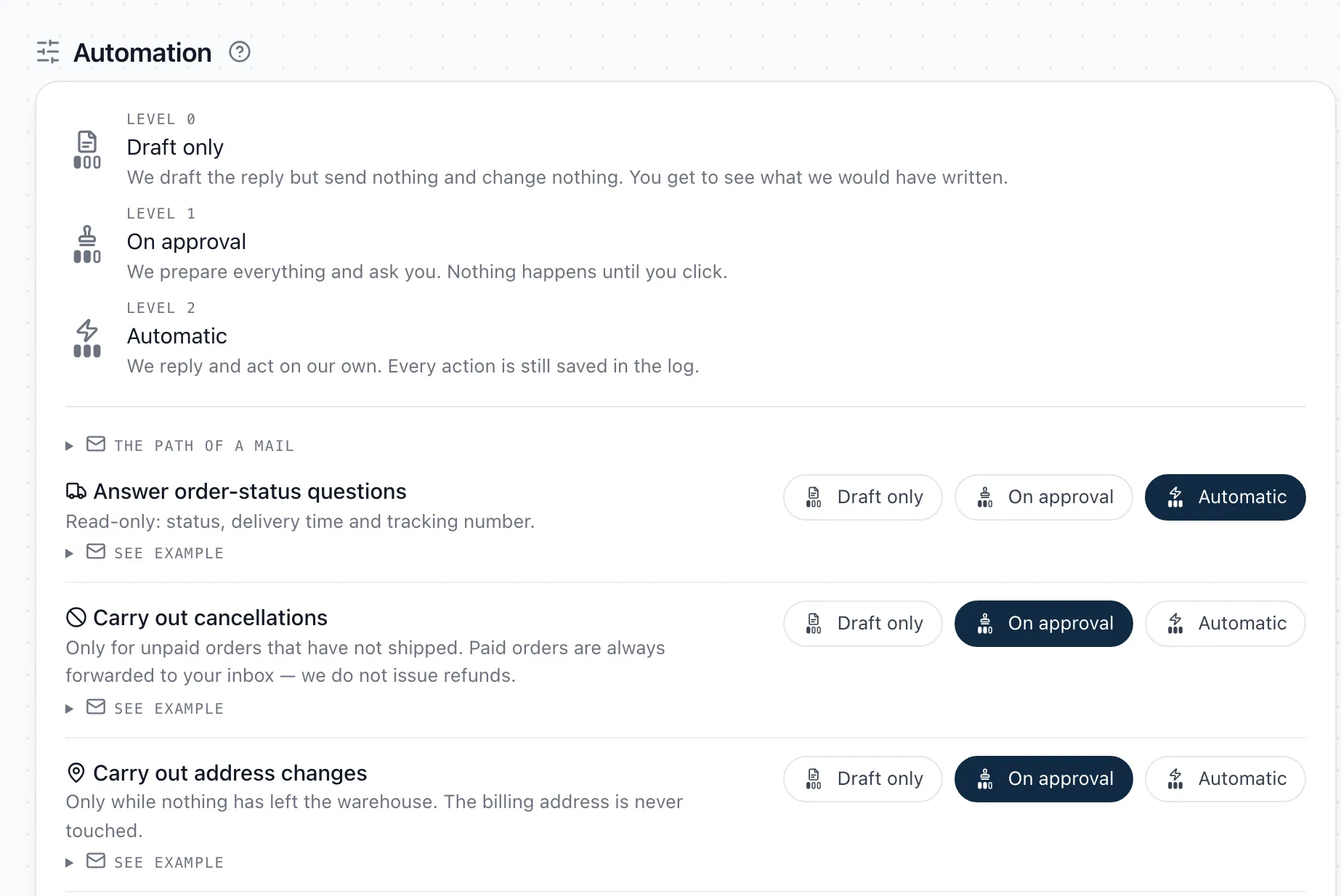
New installations start at level 0, and stay there for the first 48 hours regardless of your settings. You reach level 2 only by switching it on yourself. No default and no update will ever do that for you.
Works with your shop and your mailbox
SupportKontor works with your Shopware and your existing mailbox. No switch, no migration. You forward your service mail and nothing else changes.
Connected straight to your shop. Cancellation, address change, and return run in Shopware once you approve.
You forward, we handle the rest. Wherever your service address lives.
- Gmail
- Outlook / Microsoft 365
- IONOS
- STRATO
- All-Inkl
- mailbox.org
- and any other mailbox
Data protection
Storage is in the EU
We store messages and logs on EU servers in Amsterdam. The reply itself comes from a language model outside the EU, under a data processing agreement with EU standard contractual clauses.
No training on your data
Your customers' messages train no AI models, not at our end and not at our providers'.
Deleted after 90 days
We delete what your customers wrote after 90 days. The log entry stays: what was asked, what we did and when, without the text.
A complete log
Every reply and every action lands in the log, down to the rule that applied and the level it ran at.
Every decision is readable
“The AI decided” explains nothing. Each entry names the request it recognised, the order data it had, which of your rules applied, and what it then did in the shop.
- Request
- Cancellation · recognised 96%
- Order
- 10023 · unpaid · not yet shipped
- Rule
- Cancellation allowed while nothing has left the warehouse
- Level
- 1 · carried out after your approval
- Action in the shop
- Order cancelled · 14:07
- Reply to the customer
- sent · 14:07
A summary every Monday
Once a week, an email with what the assistant handled, and the arithmetic behind it. The estimate uses your own handling time, so you can check the number.
- 46
- answered automatically
- 7
- forwarded to your inbox
- ~4.6 h
- estimated time saved
46 answered enquiries × 6 min handling time = ~4.6 h. Forwarded messages are not counted, since you read those yourself.
For German Shopware merchants whose team is tied up in support
Replies go out in German by default, and in whatever other language a customer writes in.
Answers to common questions
Setup, approvals, and the things SupportKontor deliberately does not do.
One fixed price, no meter
One fixed price for your autonomous support, with no mailbox migration and no fee per resolved ticket. In January you know what December will cost.
plus VAT
- Automatic replies to order questions and to questions your pages answer
- Cancellation, address change, and return after your approval
- Stored in the EU, deletion after 90 days
- Full log of every reply and action
- Set up together with you
Ready to take the load off your support team?
Your customer service does not have to grow just because the shop does. You run the setup yourself, and for the first 48 hours SupportKontor only drafts. If you would rather not do it alone, we will join you on a call.